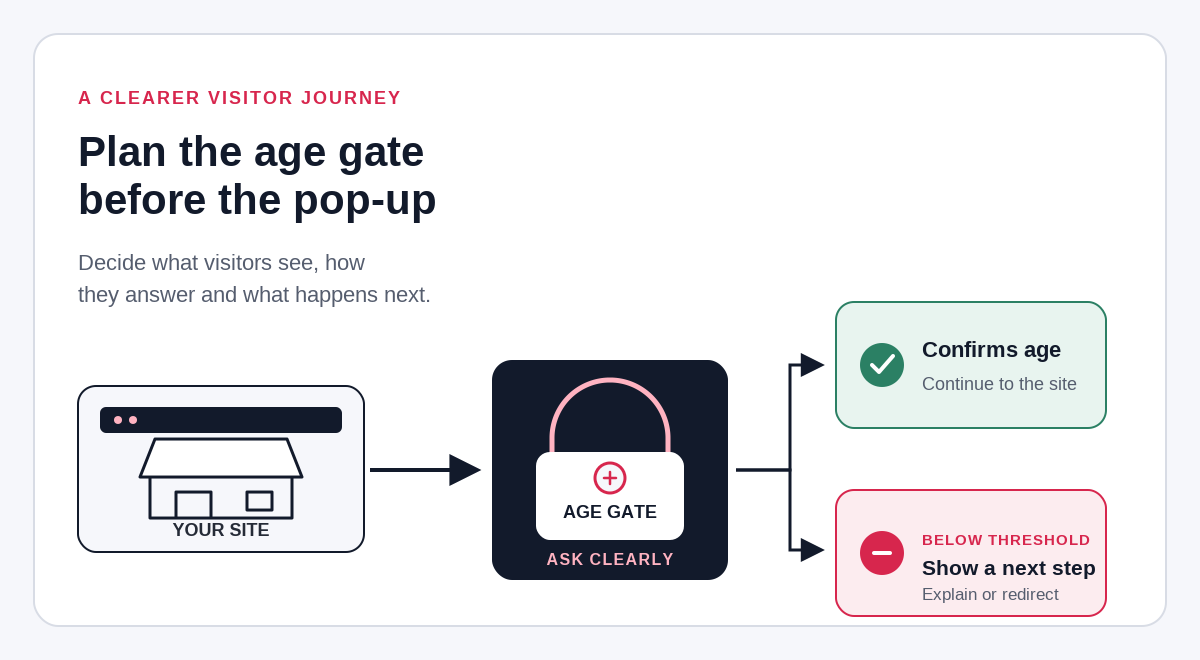
An age gate is one of those things visitors should be able to understand quickly: confirm their age, then know what happens next. But before adding an age gate to a Wix website, it helps to think beyond the pop-up’s appearance. What should it cover? How should visitors respond? And what should happen if someone says they’re under age?
A little planning can make the experience clearer for visitors—and help you choose a setup that fits your site.
- Check which pages or products need an age gate and which requirements apply to your business.
- Choose how visitors will confirm their age and what they’ll see if they can’t proceed.
- Test the experience on desktop and mobile, including the under-age flow.
- Remember that an age gate is not identity verification or a guarantee of legal compliance.
Start with what needs an age check
Begin by listing the product pages, content or other areas that prompted you to consider age verification. Is the restriction relevant across your whole site, or only in certain areas? Think through what a visitor should be able to see before answering—and what should remain inaccessible until they do.
Don’t assume one age threshold or setup applies everywhere. Requirements can vary based on what you offer and where you do business. Check the rules that apply to your situation, and seek qualified advice if you’re unsure. An app setting can’t make that decision for you.
Choose how visitors will answer
A short Yes/No question may be easy to understand and quick to answer. A date-of-birth field asks for more detail and may suit a different visitor flow. Neither option should be treated as proof of someone’s identity.
Before choosing, consider what information visitors will be asked to provide and how it will be handled. Keep the question clear, avoid asking for information you don’t need, and make sure the visitor can tell what they’re agreeing to.
Plan what happens after “No”
The under-age experience deserves as much thought as the first screen. Will visitors see a brief explanation, or be sent to another page? Whatever you choose, make the next step clear and avoid leaving visitors at a dead end.
Then test that flow from a visitor’s point of view. Check what happens after they answer “No,” reload the page or return to the site. The experience should behave as you intend, not leave the restricted content available through an overlooked route.

Test the experience on a real phone
A pop-up that looks tidy on a desktop can feel cramped on a phone. Try the full flow on both screen sizes before settling on a design.
Check that the question and buttons are easy to read and tap, that the page behind the gate doesn’t distract from the prompt, and that visitors can use the controls with a keyboard. Also test what happens when someone returns to the site, so repeat visits work the way you expect.
These checks aren’t just polish. They help you spot confusing wording, awkward layouts and unexpected steps before visitors encounter them.
Know what an age gate can—and can’t—do
An age gate asks visitors to confirm their age. A Yes/No response or date-of-birth entry does not, by itself, verify a person’s identity. And adding a gate does not automatically make a business compliant with every rule that may apply.
Treat the gate as one part of your wider approach. Review the requirements for your products, content and locations, and make sure the rest of your site behaves consistently with the experience you intend.
A quick checklist before adding an age gate to Wix
Before choosing a solution, make sure you can answer these questions:
- Which pages, products or content should the gate cover?
- What age threshold and confirmation method fit your needs?
- What should visitors see if they can’t proceed?
- Have you tested the complete flow on desktop and mobile?
- Have you checked the requirements that apply to your business and location?
A useful age gate starts with those decisions—not with a colour palette. Once the visitor flow is clear, it’s easier to choose a design and setup that feel straightforward.
Questions merchants ask
Does an age gate verify someone’s identity?
No. It collects an age response, but that alone doesn’t confirm a visitor’s identity.
What age should I set on my Wix site?
That depends on your products or content and the requirements that apply to your business and location. Check those requirements before choosing a threshold.
Does adding an age gate guarantee legal compliance?
No. An age gate is a tool for asking visitors to confirm their age; it doesn’t guarantee that a site meets every applicable requirement.
CherryBytes’ Age Verification Pop-up is now available in the Wix App Market. View the listing and add it to your site.