
AI-configured storefront boosters
Show boosters on your storefront that encourage shoppers to add more. AI helps you configure them for better results.
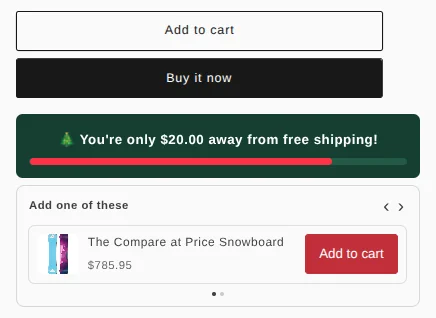
Show storefront boosters that encourage shoppers to add more to their cart. Rewards apply automatically at checkout, and AI helps you configure everything for better results.
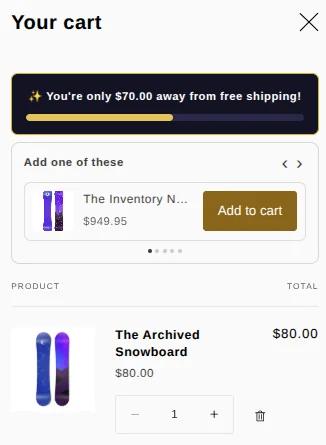
Shoppers do not know how close they are to a reward, so they stop short.
Discount codes add friction: the shopper has to find one, and you have to create and manage it.
Choosing the right goal and reward is guesswork.
Heavy storefront widgets can slow down your store.
AI supports both boosters and rewards. It helps you configure them to get better results, so you are not guessing at goals and offers.
Based on your store's typical order size.
Recommended for the goal it suggests.
Accept or adjust both.
Show boosters on your storefront that encourage shoppers to add more. AI helps you configure them for better results.
Rewards are applied automatically at checkout as app-owned discounts through a Shopify Function. Shoppers never type a code, and you never create one.
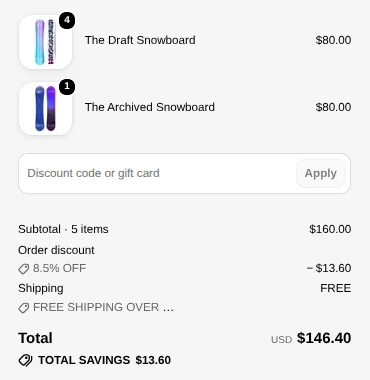
Boosters are shown on the storefront by a lightweight script.
Set up every booster and reward from the admin dashboard.
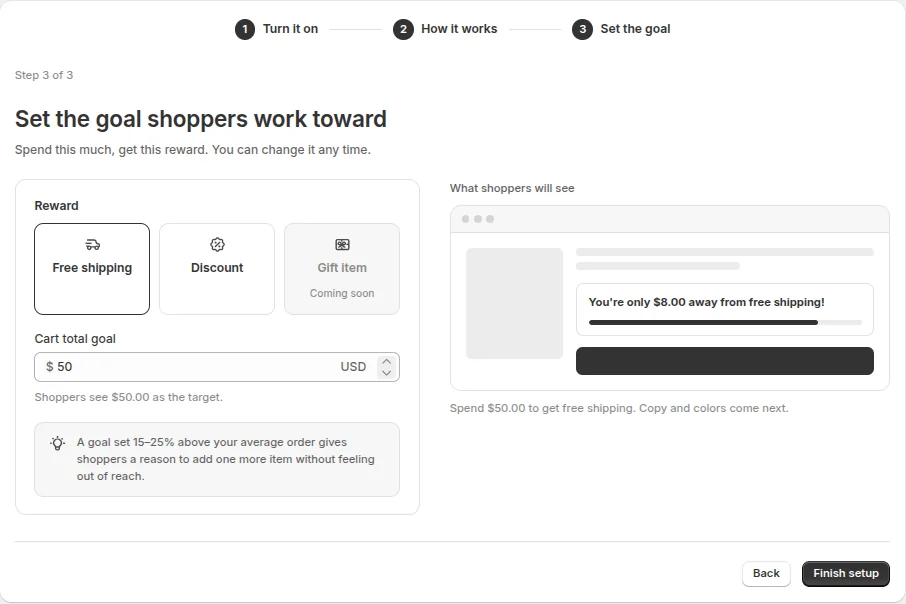
in the admin dashboard, with AI helping you configure the goal and reward.
on your storefront and add more to reach the goal.
at checkout as an automatic discount, with no code.
It suggests a cart goal based on your typical order size and recommends a reward to match. You can accept or adjust both.
No. Rewards are applied automatically at checkout as app-owned discounts.
Through a Shopify Function, as app-owned discounts.
Boosters are shown by a lightweight script.
No. Boosters are set up from an admin dashboard.
Each app installs on its own.
Install CB Order Value Booster from the Shopify App Store.
Install CB Order Value Booster