
Preorder offers you control
Create preorder offers and customize the messaging shoppers see on your storefront. Schedule when offers start and end.
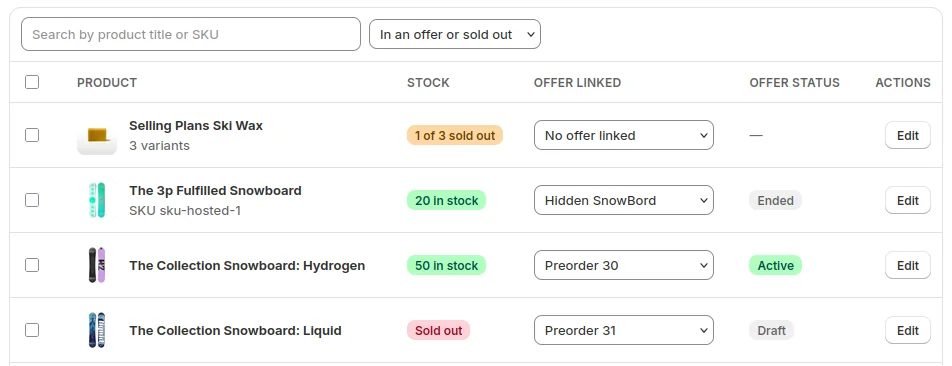
Turn sold-out products into preorders, and let shoppers sign up for Notify Me alerts. When inventory returns, Prestocka notifies them. Manage offers, alerts and fulfilment from one place.
A sold-out product page cannot take an order, so demand walks away.
Shoppers who wanted the item never hear when it is back.
Preorders taken by hand risk orders slipping through checkout on the wrong terms.
Restock emails sent by hand can go out twice, or go out after the item has sold out again.
Setting this up product by product takes too long for a large catalog.
Create preorder offers and customize the messaging shoppers see on your storefront. Schedule when offers start and end.
Shopify validation controls who can check out with preorder items, so preorders stay on your terms.
Shoppers subscribe to alerts on out-of-stock products. Prestocka monitors inventory and notifies them when it becomes available again.
Duplicate-send protection stops the same shopper getting the same alert twice. Safety checks hold alerts if a product sells out again.
Schedule notifications and customize the email template to match your brand.
Manage preorders and alerts in bulk or by collection, with back-in-stock settings per product when you need them.
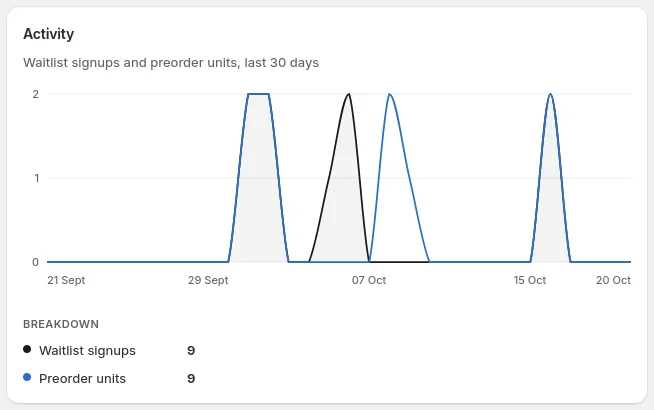
Manage preorder fulfilment in one place, and see reports and analytics on preorders and alerts.
Choose products, in bulk or by collection, and set your storefront messaging and schedule.
Shopify validation keeps preorder checkout on your terms, and shoppers join Notify Me lists.
Prestocka detects it and sends alerts, once per shopper.
Manage preorder fulfilment and check reports.
Yes. Prestocka supports bulk and collection management.
When inventory becomes available again, or on a schedule you set.
No. Duplicate-send protection prevents it.
Safety checks stop alerts for products that have sold out again.
Yes. You can customize the email template.
Through Shopify validation, which controls checkout eligibility for preorder items.
Yes. Prestocka is free to install.
Each app installs on its own.
Install CB Prestocka from the Shopify App Store.
Install CB Prestocka